UpDownMeter Free4.1
Publisher Description
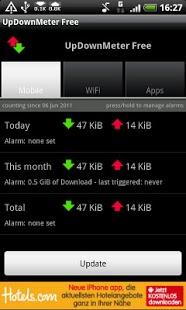
This application lets you monitor the currently used bandwidth of all your network devices (mobile, wifi) by displaying the incoming and/or outgoing traffic in the notification area (status bar at the top).
Furthermore, it counts all your traffic and stores the information on your phone, so that you're able to see how much data you have transferred today, this month and in total. It allows you to set alarms for daily/monthly/total traffic. Especially useful if you're on a plan with a traffic limit.
On devices running Froyo (2.2) or later builds it will display the traffic used by individial applications.
The application is free. It supports the developer by showing advertisements, but only while the application is in the foreground. So if you keep the app closed or in the background you will see the bandwidth used notifications but no ads!
This application requires 3 explicit permissions:
- ACCESS_NETWORK_STATE: to detect if network devices are up and for advertisements
- INTERNET: for advertisements and to allow remote logging of application errors (this can be disabled)
- RECEIVE_BOOT_COMPLETED: So that the notifications and counting of traffic can be automatically started after your phone starts (this can be disabled)
Additionally, the current Android API requires 3 implicit permissions: READ_EXTERNAL_STORAGE, READ_PHONE_STATE and WRITE_EXTERNAL_STORAGE
Any feedback is highly appreciated: updownmeter@gmail.com
About UpDownMeter Free
The company that develops UpDownMeter Free is Jonas Pohlandt. The latest version released by its developer is 4.1. This app was rated by 1 users of our site and has an average rating of 5.0.
To install UpDownMeter Free on your Android device, just click the green Continue To App button above to start the installation process. The app is listed on our website since 2015-02-23 and was downloaded 6 times. We have already checked if the download link is safe, however for your own protection we recommend that you scan the downloaded app with your antivirus. Your antivirus may detect the UpDownMeter Free as malware as malware if the download link to com.pohlandt.updownmeter is broken.
How to install UpDownMeter Free on your Android device:
- Click on the Continue To App button on our website. This will redirect you to Google Play.
- Once the UpDownMeter Free is shown in the Google Play listing of your Android device, you can start its download and installation. Tap on the Install button located below the search bar and to the right of the app icon.
- A pop-up window with the permissions required by UpDownMeter Free will be shown. Click on Accept to continue the process.
- UpDownMeter Free will be downloaded onto your device, displaying a progress. Once the download completes, the installation will start and you'll get a notification after the installation is finished.
Program Details
System requirements
Download information
Pricing
Version History
version 4.1
posted on 2015-02-23
Removed Wakelock which should result in substantial decrease of battery usage.,Replaced icons with higher resolution versions.
version 3.3
posted on 2011-06-27
Several fixes and updates
